
Make room for a wider view
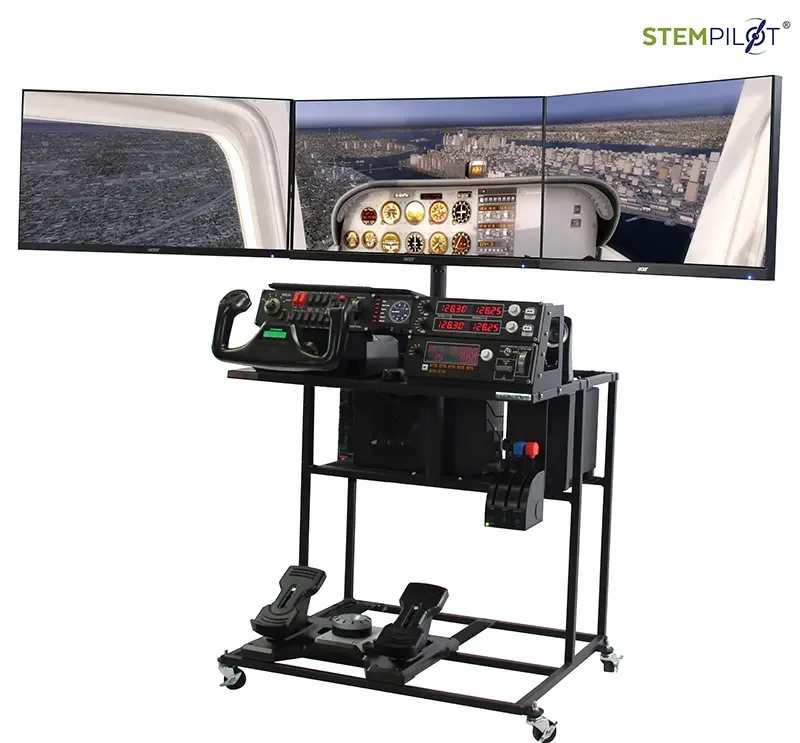
The curved display creates a broad visual field for flight missions. It can help a crew observe terrain and the instrument environment together. Plan the room around the actual screen width, student access, and sightlines rather than assuming every EduStation uses the same footprint.
Configuration at a glance
| Display | 49-inch curved HD screen |
|---|---|
| Instrument deck | NAV/COM radios, switches, autopilot, trim, and flaps |
| Controls | Yoke, throttle quadrant, and rudder pedals |
| Software | Prepar3D |
| Warranty | One year for manufacturing defects |
Curriculum and classroom use
STEMPilot pairs simulator hardware with curriculum and guided learning missions. Use the equipment to connect a flight plan to mathematics, physics, navigation, and collaborative decision-making. Students should have a question to investigate before they take the controls.
Ask for the curriculum edition, lesson materials, and teacher training associated with your selected configuration. Discuss how a Flight Crew will share planning, observation, piloting, and review during your class period.
Plan your installation
Share your room layout, student age range, and class size with STEMPilot. Confirm power, access, display clearances, delivery arrangements, support, warranty coverage, and current specifications in your written proposal. Freight and any optional equipment should be itemized.
Is pricing available?
Request a current quote for the selected configuration, freight, optional equipment, and training. The existing catalog also lists current products.
Can this support a shared classroom?
Plan a rotation in which students work on flight planning and reflection while a crew uses the simulator. Confirm the equipment footprint and room circulation before ordering.
Configuration source: EduStation Pro Curve in the official catalog ↗. Check your quote for final specifications.